Server Solutions
Dedicated Server Rental Meet your physical server needs with dedicated server rental Explore Now
Virtual Servers Scalable, high-availability server rental services with our high-performance cloud server solutions. Explore Now
İlkbyte Cloud Fully developed by Netinternet, flexible and scalable cloud servers with cloud technology Explore Now
GPU-Based AI Infrastructure High-performance GPU solutions created on a project basis for your AI and machine learning projects Explore Now

Server & Hardware Procurement Server and hardware procurement services with equipment suitable for your projects Explore Now
Customized Infrastructure Solutions Custom-designed infrastructure solutions and technical consulting services for your unique needs Explore Now
Hosting Services
Cabinet Rental Dedicated 15U, 24U and 48U smart cabinet systems allocated for you Explore Now
Server Colocation Individual server hosting service in shared cabinet systems Explore Now
Premium Connectivity Fast and reliable internet access with multi-carrier, multi-IXP and high-capacity Anti-DDoS protection Explore Now
Telecom Data Center Circuit Low-cost and high-performance internet access through a dedicated data center tariff Explore Now
Cross-Connect Direct connection between network carriers with low latency and high performance Explore Now
IP Address Pricing IP address and ASN rental services with RIPE LIR management services Explore Now
Managed Services
Managed Server Installation, configuration, regular maintenance, updates and 24/7 monitoring of your server operating system Explore Now
Managed Infrastructure End-to-end management of your entire IT infrastructure including data center, storage, virtualization and backup Explore Now
Managed Network Professional management and monitoring of network devices (router, switch, firewall) configuration, optimization and performance Explore Now
Managed Cloud (Public / Private) Professional management of your public and private cloud infrastructures to meet your cloud needs Explore Now
Managed Security 24/7 monitoring, analysis and response services against cyber security threats Explore Now
Managed Backup & Disaster Recovery Backup and disaster recovery plans, implementation, operation to ensure your data security and business continuity Explore Now
License Rental
cPanel Licenses cPanel software license rental solutions Explore Now
Plesk Licenses Plesk software license rental solutions Explore Now
DirectAdmin Licenses DirectAdmin software license rental solutions Explore Now
LiteSpeed Licenses LiteSpeed software license rental solutions Explore Now
CloudLinux Licenses CloudLinux software license rental solutions Explore Now
Cyber Security
HEIMWALL Fully developed by Netinternet, protect against cyber attacks with our Web Application Firewall solution Explore Now →
AntiDDoS High-capacity volumetric Anti-DDoS protection provided free by default on all our services Explore Now →
VPN Solutions Secure, encrypted tunnel connections for your remote offices and employees with our managed VPN solutions Explore Now →
Layer4 Stateless Firewall Layer4 stateless firewall solution for filtering and directing incoming traffic Explore Now →
SSL Certificates Secure connection solutions with free and paid SSL/TLS certificate options Explore Now →
Penetration Tests Penetration tests performed by third parties in cooperation with TSE-approved testing firms Explore Now →
Corporate Email
Corporate Email Solutions Fully domestic, KVKK compliant, 100% compatible with Outlook and all mail programs, professional, uninterrupted email service Explore Now →
Bulk Email Sending Manageable bulk email sending services with high delivery rates for your marketing campaigns Explore Now →
Email Archiving Secure archiving of all your email traffic to protect corporate memory and comply with legal requirements Explore Now →
Free Email Migration Service Wherever your email service is, we migrate you to Netinternet corporate email solution for free! Explore Now →
Traditional Web Hosting
cPanel Web Hosting Fast and reliable hosting packages with easy setup and management using cPanel, the world's most popular hosting management panel. Explore Now →
cPanel Reseller Hosting Fully customizable cPanel-based reseller hosting solution for starting your own hosting business Explore Now →
DirectAdmin Reseller Hosting Scalable and cost-effective reseller hosting powered by lightweight DirectAdmin control panel Explore Now →
Free Hosting Migration Service Professional migration services to move your existing systems to Netinternet data center infrastructure Explore Now →
Domain Names
Domain Registration Services Domain registration and easy management at the most affordable prices in all popular extensions (.com, .net, .org, etc.) Explore Now →
Domain Transfer Services Transfer your domains to Netinternet for professional domain management services Explore Now →
Domain Reseller Flexible and reliable reseller program and integration services for offering domain registration to your customers Explore Now →
Free Hosting with Domain Free hosting service for domains registered or transferred to Netinternet Explore Now →
Hosting & Cloud Service Providers High-density infrastructures, multi-tenant architectures and SLA-focused sustainable data center solutions for hosting and cloud providers Explore Now →
E-Commerce Companies High-performance, secure and uninterrupted e-commerce infrastructures resilient to sudden traffic surges during campaign periods Explore Now →
Software Developers Developer-friendly infrastructure solutions with CI/CD compatible, API-supported, automation-ready flexible resource management Explore Now →
SaaS Providers Scalable, high-availability and continuity-focused cloud infrastructures suitable for SaaS architectures serving many users. Explore Now →
AI & R&D GPU-based high-performance and scalable infrastructures for big data processing, model training and high computation tasks Explore Now →
Agencies & Marketing Multi-client management compatible, quick setup, high-performance and flexible web hosting infrastructures Explore Now →
Media & Broadcasting High bandwidth and low latency infrastructure solutions for live streaming, video and heavy content traffic Explore Now →
Banks & Fintech Regulation-compliant, Tier-3/Tier-4 standard, highly secure financial infrastructures ensuring uninterrupted service Explore Now →
Government & Education Long-term, sustainable and secure infrastructure solutions compliant with regulations and data security requirements Explore Now →
Manufacturing / Industry Low-latency and high-availability infrastructure solutions compatible with Industry 4.0, IoT and production automation systems Explore Now →
Healthcare Organizations Highly secure and uninterrupted health informatics infrastructures prioritizing patient data privacy and continuity Explore Now →
HEIMWALL – Web Application Firewall Protect your web applications against advanced attacks with our 100% domestic WAF platform HEIMWALL Explore Now →
Ilkbyte - Cloud Server Service Scalable and high-performance cloud servers deployable in seconds with our domestically developed orchestration infrastructure Explore Now →
Netrafix - Bandwidth Monitoring Manage 5651 compliant logging and bandwidth billing (Burst, Traffic Quota, 95th Percentile) in one platform with sFlow, NetFlow and IPFIX supported Netrafix Explore Now →
Secure Internet - For ISPs Keep your DNS traffic in your own network with 100% domestic DNS software developed for authorized ISPs Explore Now →
DirectIP - IP Management System 100% domestic IP management platform developed by Netinternet for centralized IP address, subnet, VLAN and DHCP management Explore Now →
RuleDNS - Rule-Based DNS Management Dynamically manage DNS responses with rule-based RuleDNS, easily integrate CDN and services with API support Explore Now →
Documents / Whitepapers Developer-focused technical documentation covering all API endpoints, usage scenarios and automation examples Explore Now →
API Documentation Developer-focused technical documentation covering API endpoints, usage scenarios and automation examples for platform integration Explore Now →
Peering Policies Reference policies transparently explaining our network architecture, traffic exchange principles and peering criteria Explore Now →
Frequently Asked Technical Questions Clear and actionable answers to the most frequently asked technical questions about infrastructure, security and operations Explore Now →
System Status Status page transparently sharing real-time status, planned maintenance and past outages of all platforms and services Explore Now →
Our Physical Data Center
Our Physical Data Center Our corporate data center facility designed with high security standards and redundant power and cooling infrastructure Explore Now →
Power, Cooling, Security Facility architecture designed for critical infrastructures with redundant power lines, climate systems and multi-layered physical security Explore Now →
Internet Access Points Low-latency and high-availability backbone connections through multiple operators and internet exchange points Explore Now →
Network Infrastructure
Network Infrastructure Uninterrupted connectivity infrastructure with multi-carrier connections, redundant backbone and high-capacity network architecture Explore Now →
Network Policies Sustainable network operation policies with transparently defined rules for traffic management, peering, security and capacity usage Explore Now →
Planning and Processes Scalable and controlled network management approach with pre-designed network capacity planning, growth scenarios and operational processes Explore Now →
Certificates and Documents
Our Certifications We provide auditable and sustainable infrastructure standards with our certifications for information security and service continuity Explore Now →
Security Policy We ensure protection of infrastructure and data with our security policies covering information security, access control and risk management Explore Now →
KVKK Compliance Data processing and storage structure compliant with KVKK and related regulations with defined technical and administrative measures for personal data protection. Explore Now →
Quality Policy Our quality management policies within the scope of ISO 9001 for continuous improvement of service quality. Explore Now →
Service Management Policy Our policies and standards governing IT service management processes within the scope of ISO/IEC 20000-1. Explore Now →
Business Continuity Policy Our ISO 22301 compliant policies and procedures ensuring business continuity against possible outage scenarios. Explore Now →
Incident Management Policy Our incident management processes and action plans for the detection, response and resolution of security incidents. Explore Now →
Supplier Security Policy Our policy governing information security requirements and risk assessment processes in supplier relationships. Explore Now →
Disclosure Text Text prepared within the scope of our disclosure obligation regarding the processing of your personal data under KVKK. Explore Now →
Cookie Policy Our policy regarding cookies and data collection practices used on our website. Explore Now →
Hosting Provider and Legal Obligation Policy Legal obligations we fulfill as a hosting provider under Law No. 5651. Explore Now →
Blog Posts Technical analyses, sector evaluations and current content about data center, network, cyber security and cloud technologies Explore Now →
Case Studies Reference case studies describing needs encountered, solutions applied and outcomes achieved in real projects Explore Now →
Events and Announcements Events we attend and organize, technical meetings, launches and current announcements about Netinternet Explore Now →
19 Years of Experience

Blog Posts

Discover the success stories of our customers' digital transformation journeys. Each project demonstrates the power of our reliable infrastructure.

Başarı Hikayeleri
Servisler
1597 Hit
2 Comments

Information About Unlimited Hosting Services

Contracts not read by users, server systems where infrastructure planning cannot be done, arguments about “but it was supposed to be unlimited” and disappointments. In this blog post written for informational purposes about unlimited hosting services, we will share with you the important notes you need to know.


If you are undecided in choosing web hosting, please read this blog post all the way to the end without a break so that your business continuity is not interrupted.


sinir


Our company Netinternet removed its Unlimited or Unlimited Hosting services from service in 2017 after providing them for a long time, and has now begun providing hosting services with packages that have defined limits. In this article, we will share with you what has happened to us with “Unlimited” or “Boundless” or “Unlimited” (absolutely the same meaning…) Hosting service and why we no longer provide this service. You may find this blog post unethical given that we currently do not provide web hosting service without limits and because we provided this service in the past. First of all, let us emphasize that our aim is not to defame/slander companies offering such services, and that this service was also offered by our company at one time!


The purpose of these types of hosting services is to ensure that users receive service without quota concerns. Thus, the user quickly chooses between services and purchases a service. Unlimited hosting is misunderstood by many users. Because it is unlimited, they think they can put terabyte-sized files and consume terabyte-sized traffic in a hosting service with an average price between 50 and 100 USD. However, this is not the case. In services without limit positioning, the limit is limited according to the fair use quota known as AKK, which is very well known by today’s home internet users. While this is clearly stated in the usage agreements of companies that do their job professionally, the AKK here is implied and stated in a gray area.


Since there is no organization that measures the quality of the service given by hosting companies and audits them, this topic is incredibly open to abuse. Generally, there are contract clauses about the files in your FTP account consisting of files necessary for a website to work. According to these clauses, using your FTP account as a file repository is prohibited. The most clear measure regarding fair use begins with a limit called Inode. Inode can be described as a database that stores information about each file in the file system, storing the modification dates of files, user ownership, access permissions. It can also roughly be described as the number of files. This limit is valid and fixed for each hard disk. Without this limit, the server administrator could never back up the system quickly. Even incremental backups of servers with high Inode limits can reach durations exceeding a week. In this state, since the backup process affects the read/write performance of the hard disk until it is complete, it can cause web sites running on the server to work at an unbearable slowness. At the same time, as I mentioned, since Inode has a fixed size valid for each hard disk, when the Inode limit is reached, no new file can be written even though there is free disk space on the hard disk. This is the worst case scenario; database service, folders where temporary files are created, session records, everything closes at once and becomes non-functional. Since nobody would want this, in services where disk quota is given as unlimited, Inode is given as limited. When we look at it, we generally see that these kinds of limits are only in the contract. Since this limit is generally not mentioned in the service package features, those who hit the Inode limit experience great surprise by saying “but my service was supposed to be unlimited.”


First of all, we thought it would not be necessary to state anywhere in the blog post that there is no technology in the world with unlimited internet bandwidth and similarly unlimited size hard disks, so we did not write it.


Continuing with what we have to say, the dangers in unlimited hosting service are not limited to these. (Danger; are the errors that may arise as a result of giving some resources as unlimited in the unlimited service.) Servers will never work within a standard for the given service. While disk quota is 60% empty and internet bandwidth is at 80% in some servers, disk quota may be 95% and bandwidth may not even be 10% in some servers. In this case, making future-oriented resource planning becomes extremely impossible. As these plans are made only approximately, when the business providing the service starts losing money from OverSelling (we will discuss this in detail shortly) in some servers, it starts moving hosting accounts with high resource usage on servers from one server to another. This is a situation that disrupts business continuity and can even cause data loss due to the timeout experienced during the transition between two servers when DNS records change and TTL periods. In situations that will affect general user services, the inter-server transfer process is started and completed immediately, at that moment, without the knowledge of the web hosting owner. Since no notification is given, you may notice a problem very late. Perhaps the damage may have already been done.


So why are all these headaches tolerated? The answer is: for high levels of OverSelling revenue. What is OverSelling? In the service sector, it is the continuation of sales to a certain extent after reaching the sales limit of intangible goods without ending the sale. You can take your mobile phone tariff as an example. A service for which 10 units are paid and which sells 1000 minutes in every direction only allows 1000 minutes of use for the current month, and when you make 200 minutes of use at the end of the month, your unused 800 minutes will not be carried over to the next month. This is an example of OverSelling. It is a method of generating revenue from unused resources frequently used in IT, telecommunications, and internet fields.


Hosting companies aim to generate revenue with the maximum OverSelling ratio in unlimited hosting service. In this case, hosting the maximum number of accounts on servers is the commercial priority of companies, and so they strive to push users with high traffic and disk usage out of their system as soon as possible. Returning to the beginning of our article, since there is no organization that audits or measures hosting companies, with the gray areas in contracts, your service can be terminated when you least expect it. In this case, you will have disrupted your established order and business continuity once again and will be forced to look for a new hosting and transfer your data. A complete waste of time!


As a result, at the end of this article about unlimited hosting targeting users to receive service without quota concerns, you may have developed different concerns about your business continuity beyond quota concerns. In order not to use a service full of surprises and to maintain your business continuity at the highest level, we recommend choosing hosting packages with defined limits where you definitely know what you are buying and that do not have gray contracts or hidden and secret rules.


One of the main reasons for removing the unlimited hosting service in 2017, in addition to the topics mentioned above, was that it was a service inconsistent with our company’s vision/mission which values business continuity and transparency, and we removed it thinking it was a service that damaged our company’s commercial reputation since it could not be correctly resource-planned and was misunderstood by dissatisfied users.

1597 Hit
0 Comments
View Details
Webmaster
462 Hit
2 Comments

Separation of Virtual Data Center and Wholesale Services

Dear Customers,


Throughout our 11 years of commercial activity, the largest customers of our company have always been businesses providing hosting services for commercial purposes. We have initiated a process to separate all our customers receiving services at the wholesale level from Netinternet and have them receive services through our other company, Veri Merkezi Teknolojileri, which is a 100% Netinternet subsidiary, in order to provide more specialized service to these businesses, coordinate our teams accordingly, and have more favorable price tariffs at the wholesale level.


This change has been made/planned entirely in accordance with the requests, complaints and needs of our customers receiving services at the wholesale level, with the aim of meeting all technical and administrative needs fully and flawlessly through a control panel written for web hosting companies, and maintaining business continuity at the highest level with a dedicated technical team to manage this process.


As a result of all these efforts, Veri Merkezi Teknolojileri, which will also begin serving with multiple locations, will again ensure that the gap between us and our competitors in terms of price/performance opens up boundlessly in recent years.


Information about Veri Merkezi Teknolojileri;


Website: www.verimerkezi.com.tr


Facebook: facebook.com/verimerkezi


Twitter: twitter.com/verimerkezi


You can get detailed information about this entire process through your customer representative.


We present this for your information and wish you profitable days.


Netinternet Bilisim Teknolojileri AS

General Manager - Osman MAKAL

462 Hit
0 Comments
View Details
İnternet
1973 Hit
2 Comments

How to Configure WordPress SMTP Mail Settings?

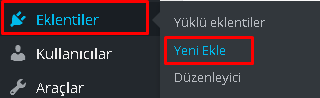
1-) From our WordPress admin panel, we click Plugins -> Add New;

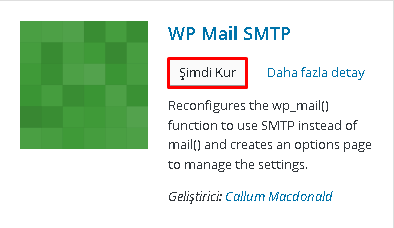
2-) We searched for and found the wp-mail-smtp plugin. We click Install Now;

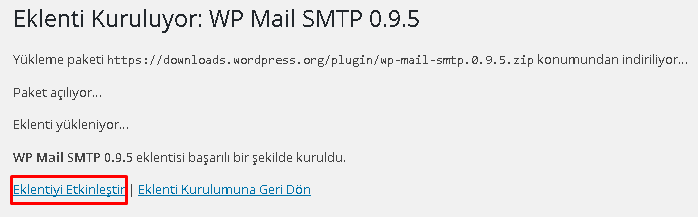
3-) WP Mail SMTP plugin was successfully installed. We click Activate Plugin;

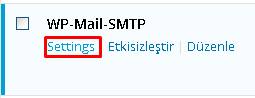
4-) We click Settings for SMTP settings;

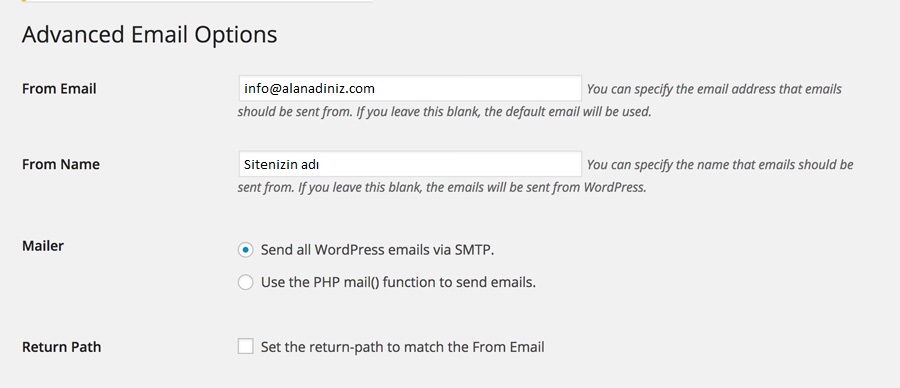
  • From Email: The email account you created under your hosting
  • From Name: The name from which emails will be sent
  • Mailer: Send all wordpress emails via SMTP must be selected.
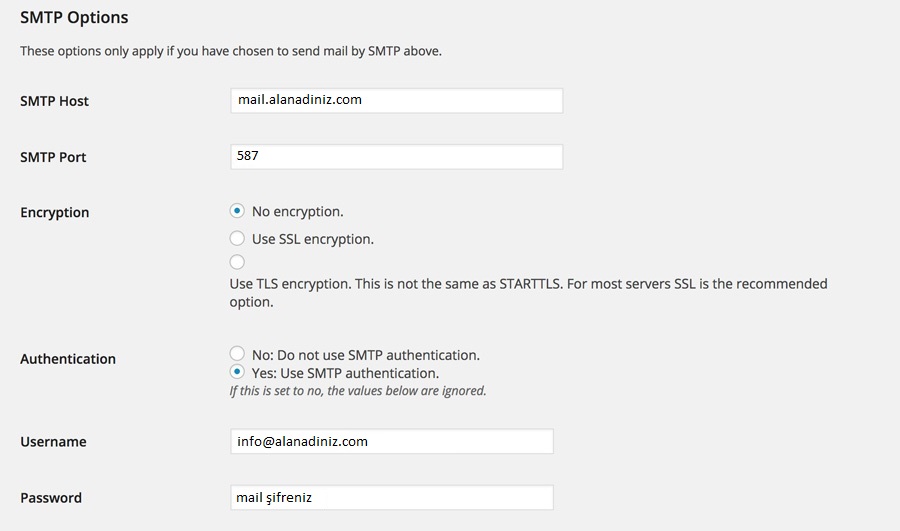
  • Smtp Host: Must be localhost.
  • Smtp Port: Must be 587.
  • Encryption: Type of encryption. No Encryption should be selected for email accounts created on hosting.
  • Authentication: Yes: Use SMTP Authentication must be selected.
  • Username: The email account you created under your hosting
  • Password: The password of the email account you created under your hosting


5-) In the From Email section, we enter the email address that will appear in the recipient’s inbox.

6-) In the From Name section, you can write your site name or your own name.

7-) Mailer and Return Path options remain as shown in the image.

8-) After making the necessary adjustments, we click Save Changes;

After doing all of this, you can send yourself a test email from the Send a Test Email section at the very bottom.

1973 Hit
0 Comments
View Details
İnternet
1123 Hit
2 Comments

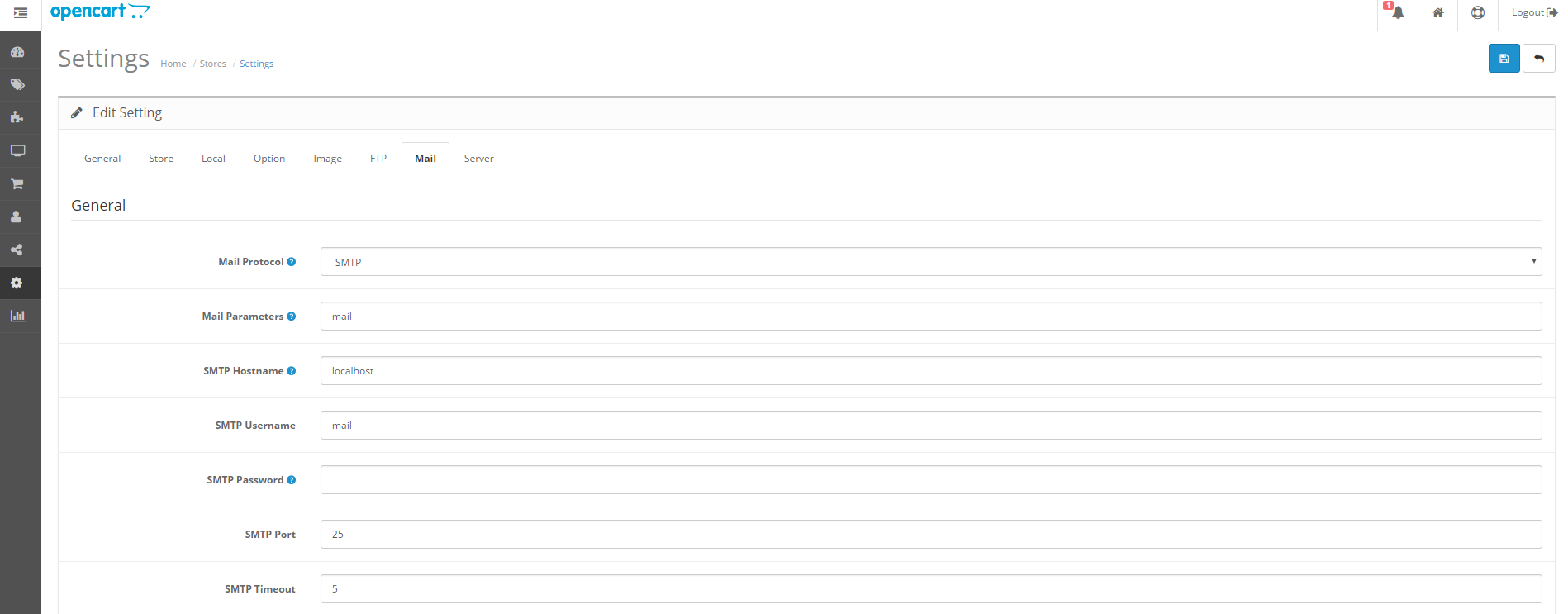
Opencart SMTP Mail Settings

To access the Opencart admin panel, we log in with our Username and Password through the admin panel at www.yourdomain.extension/admin.


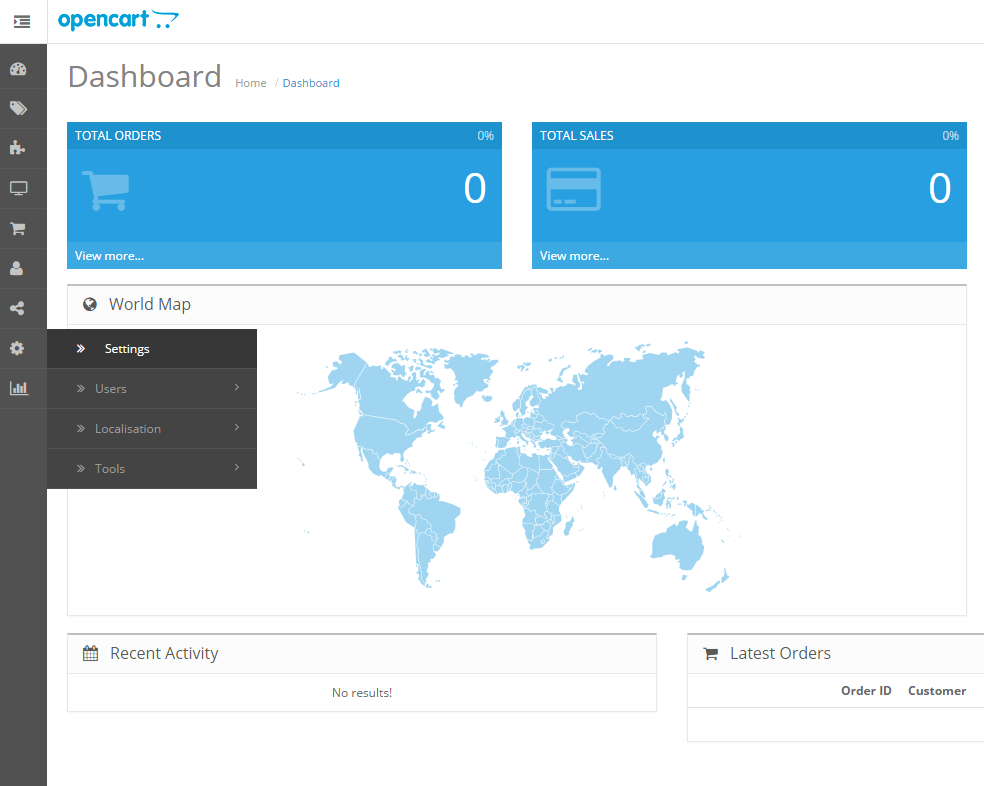
1) After logging into the admin panel, we expand the menu by clicking the icon at the top left, then click the System button.


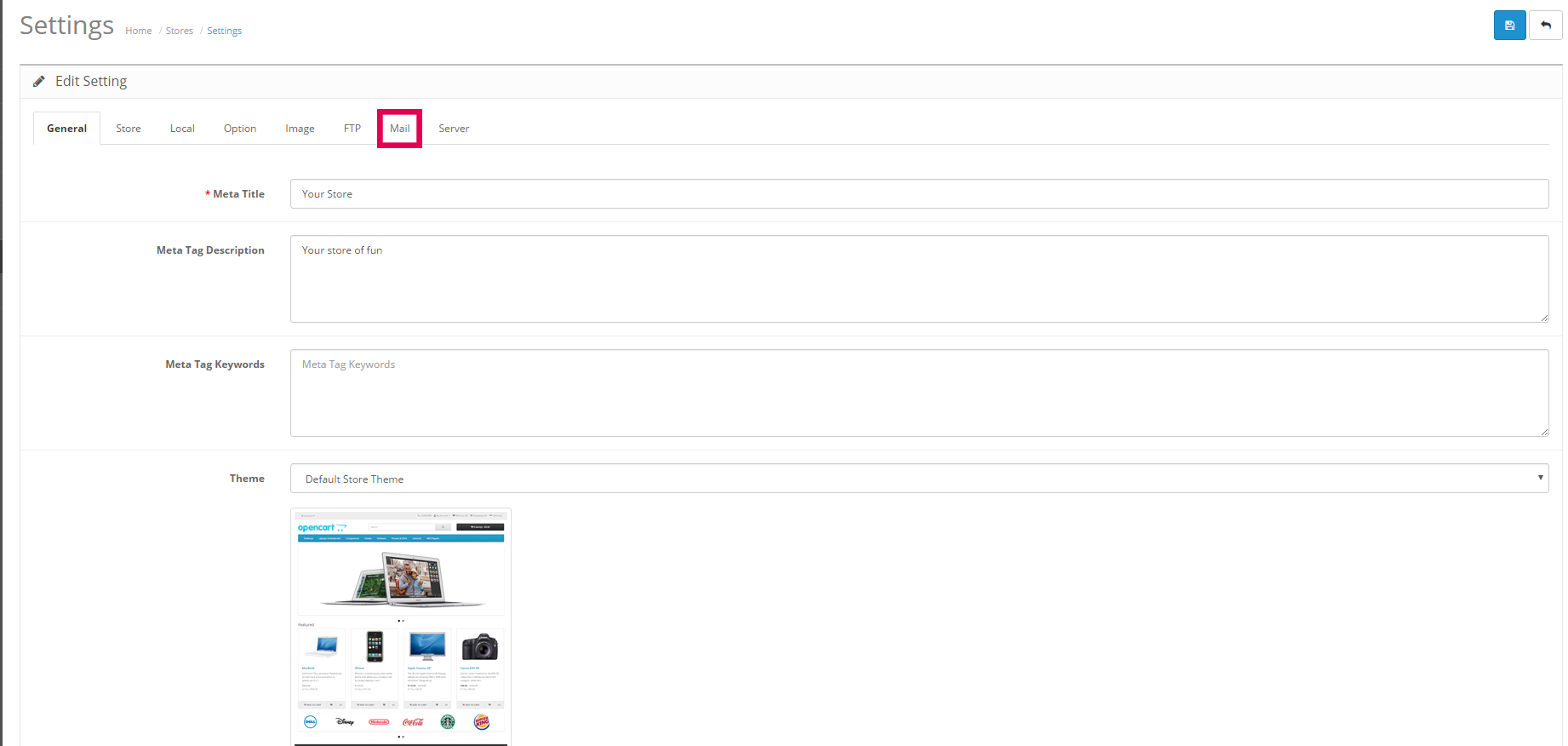
2) In the section that opens, we click on the edit settings step in the form of a pencil icon on the left side.


3) In this step, we click on the Mail section indicated by the red area at the top.


After making these settings, your Opencart mail settings will have been successfully completed.

1123 Hit
0 Comments
View Details
Webmaster
1163 Hit
2 Comments

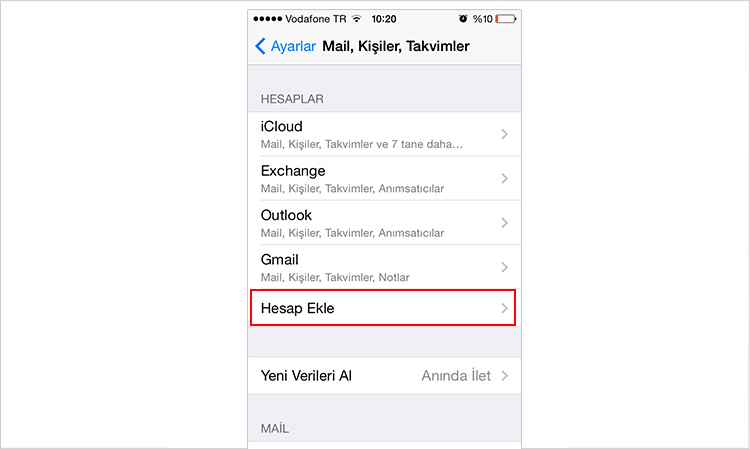
Setting Up an Email Account for iPhone & iPad

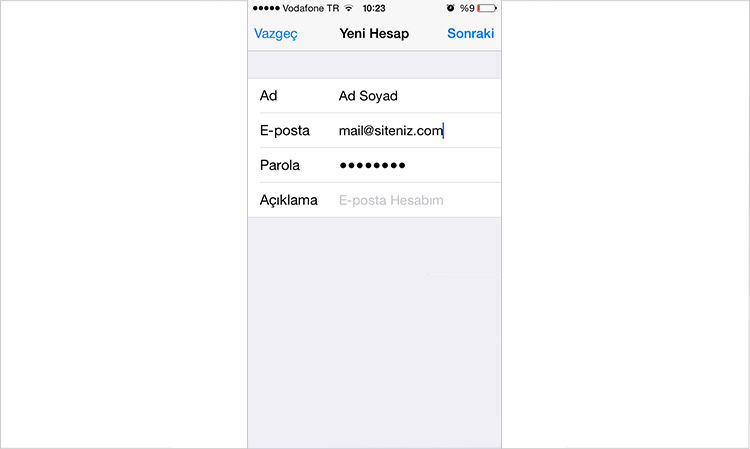
Step 1: For email setup, first go to the Add Account section as shown in the screenshot above.


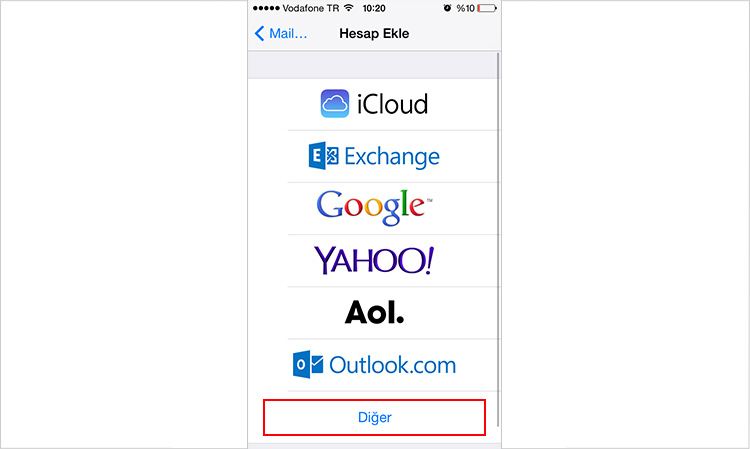
Step 2: From the options that appear, choose the option that says Other.


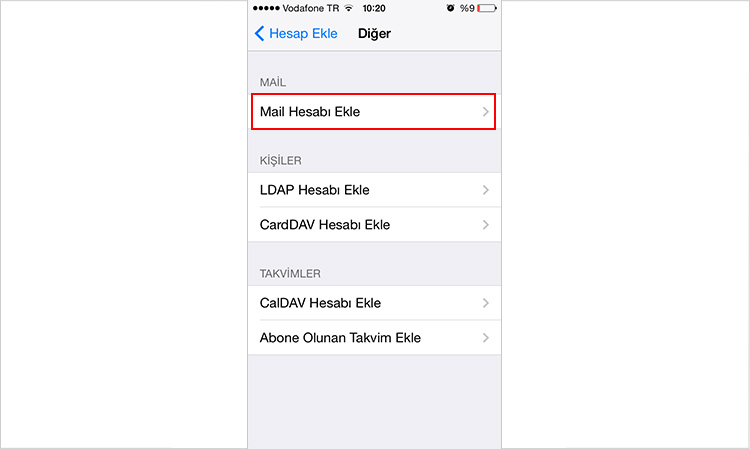
Step 3: On the next screen, choose the add mail account option.


Step 4: Enter the name that will appear for your mail address in the Name field. Enter your mail address and that mail’s password in the field just below. This is not a field where you can change the mail address password. This is the field where you will enter your mail address you want to set up and its password.


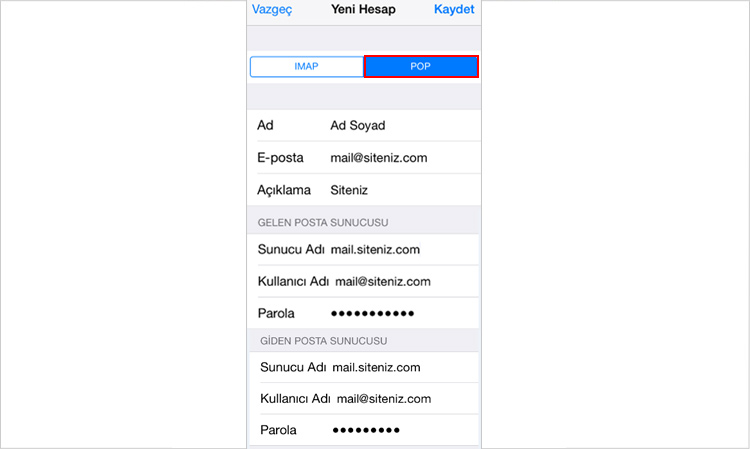
Step 5: In the next step, after choosing POP from the options in the menu that appears, you can make your settings.
Enter the First and Last Name information for your email account.
Email: Enter the mail account you want to set up and have activated from your management panel.


Incoming & Outgoing Mail Server


Server Name: You must write mail.yoursite.com in this field, but you must replace yoursite.com with your own website address.


Username: You need to write the mail address you want to set up.
Password: You need to enter the password of the mail address you want to set up.


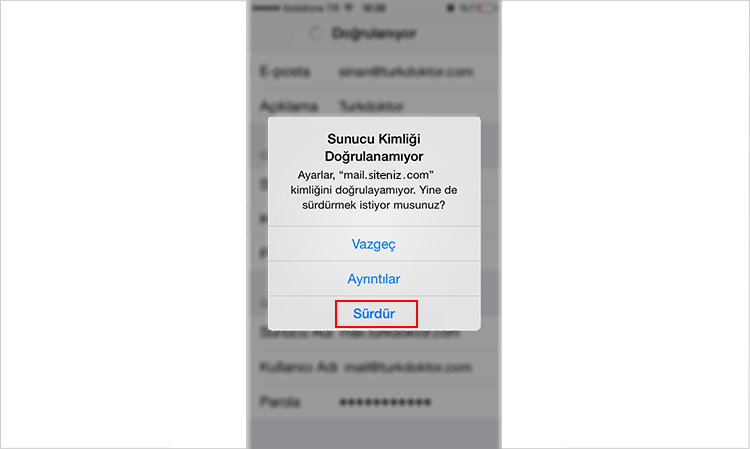
After these settings, when you press the save button, a screen related to server verification failure will appear.


On this screen that appears, continue by pressing the continue button.


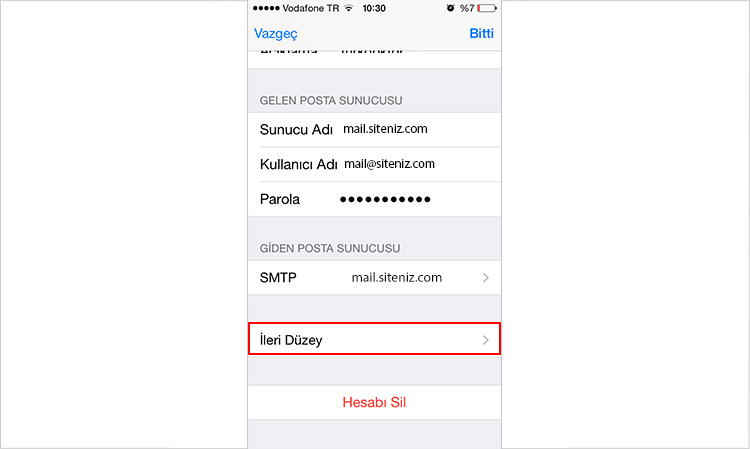
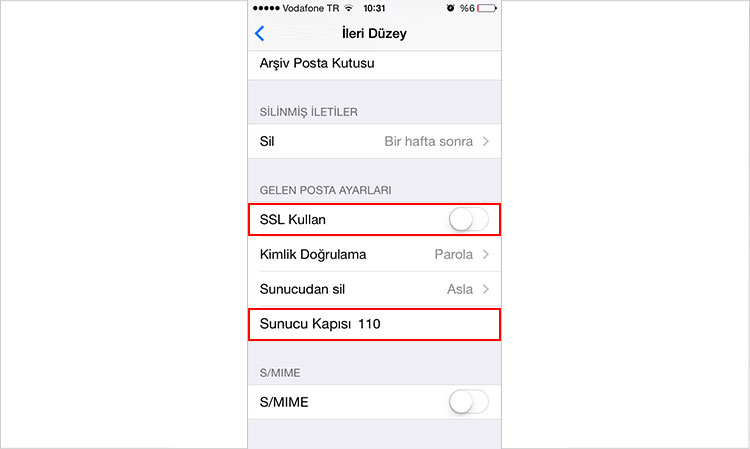
On the screen containing your mail account settings, go to the Advanced link at the bottom.


Turn off the Use SSL setting and set the Server Port to 110. You have made these settings for Incoming Mail Settings, now let us also look at the necessary adjustments for Outgoing Mail settings.


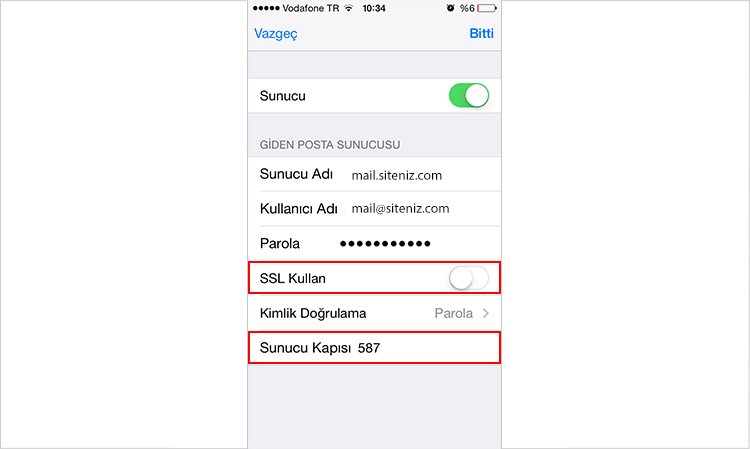
For the outgoing mail server, you must write mail.yoursite.com for the server name. But instead of yoursite.com, you must write your own website address.


Enter the mail address you set up in the username field.
Turn off the Use SSL feature.
The Server Port should be 587.


After these settings, you can complete the process by pressing the save button.

1163 Hit
0 Comments
View Details
Webmaster
1271 Hit
2 Comments

Inode Limit

Inode Limit


An inode (index node) contains metadata information (file structure, file size, etc.).
The inode limit contains data structure information found in the Linux operating system. The inode count refers to the number of files in your account. That is, each file (email, image, etc.) in your hosting account means one inode. The total of all files in your account makes up the inode count.


How Can I Reduce the Inode Count?


To reduce the inode count, it will be sufficient to remove unnecessary files from your account.


Inode Information on cPanel


It is located in the Statistics section of the cPanel main menu.


1271 Hit
0 Comments
View Details
Webmaster
1921 Hit
2 Comments

Setting Up an Email Account on Android Devices

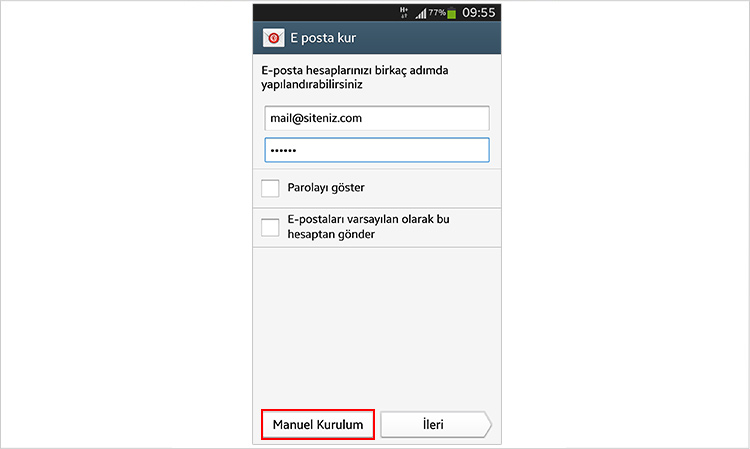
Step 1: In the email setup section, enter your “Email” address and “password”, then click the next button.


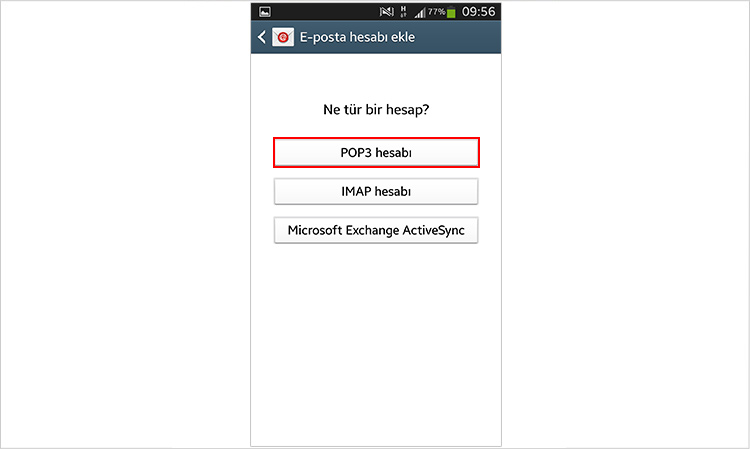
Step 2: In the add email account section, click the “POP 3 account” button.


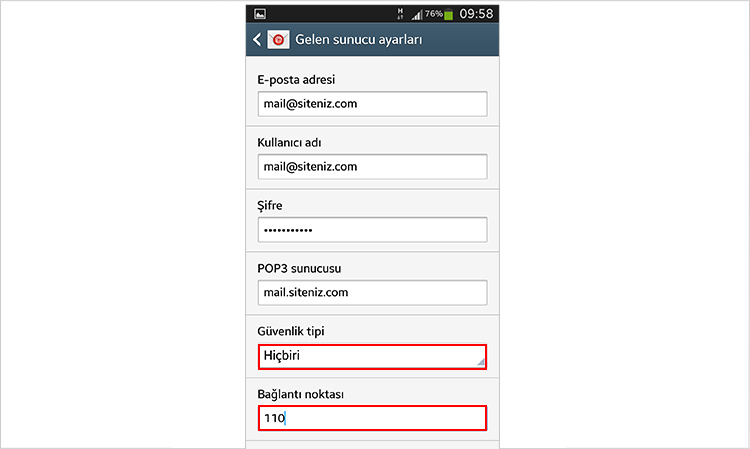
Step 3: In the incoming server settings section,


  • Username: your email address

  • Password: your email address password

  • Security Type: None

  • Port: 110

  • Click the next button.


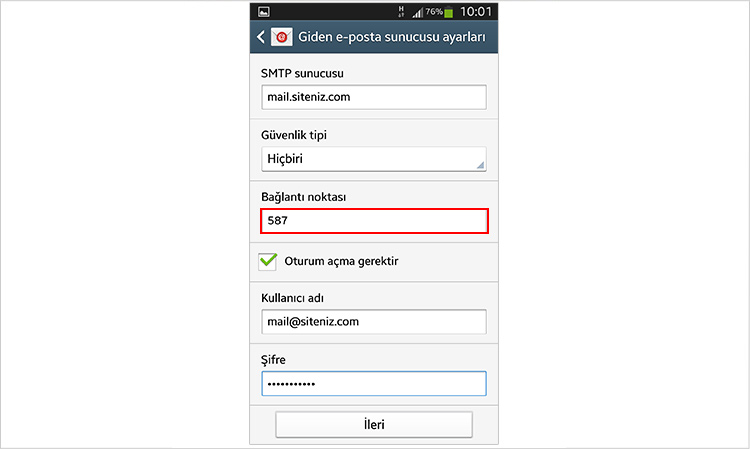
Step 4: In the outgoing email server settings section;
SMTP server: mail.sitename.com (e.g.; mail.netinternet.com.tr)
Security Type: None
Click the next button.


Step 5: You can set the email check frequency from the account options section.


Step 6: You can give a name to the email account you set up.

1921 Hit
0 Comments
View Details
Webmaster
872 Hit
2 Comments

Joomla Released Security Update

General Information


Joomla, one of the most widely used content management systems (CMS), released version 3.8.2 to address vulnerabilities found in the software.


Impact


On systems affected by existing security vulnerabilities, it is possible for cyber attackers to access sensitive information.


Solution


Netinternet recommends reviewing the relevant security advisories published for Joomla! Content Management System (CMS) and applying the necessary updates.


Source


https://www.us-cert.gov/ncas/current-activity/2017/11/07/Joomla-Releases-Security-Update
https://www.joomla.org/announcements/release-news/5716-joomla-3-8-2-release.html

872 Hit
0 Comments
View Details
Servisler
759 Hit
2 Comments

How to Monitor Traffic Usage on Netinternet Physical Servers?

Introduction


Whether you use web hosting or a server, there is always a traffic limit on the services you use when publishing your websites or projects on the internet. Although many companies today provide unlimited traffic services, technically nothing in nature is truly unlimited. It is presented as unlimited traffic only because the extra usage you consume is not charged. However, if you are not using unlimited traffic services, it will be useful for you to monitor the traffic you use. This way, you can avoid high-cost overage invoices.


Traffic Usage Monitoring at Netinternet


For the physical dedicated server and colocation services you receive, we allow you to monitor how much traffic your server uses through your customer panel. This way, you can compare the traffic limit you purchased with the traffic you use and switch to a higher traffic package based on your needs. This prevents extra invoices that may be generated as traffic overage charges. Now let us look at how you can monitor traffic usage on the physical server service you have received from our company.


NOTE: In order to monitor traffic usage on your physical server, traffic reports must be active. If you cannot see traffic reports, please contact technical support.


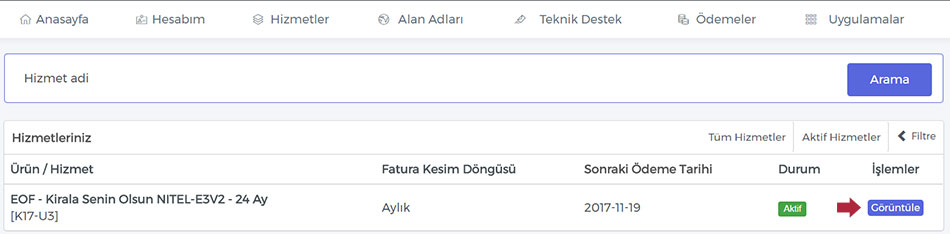
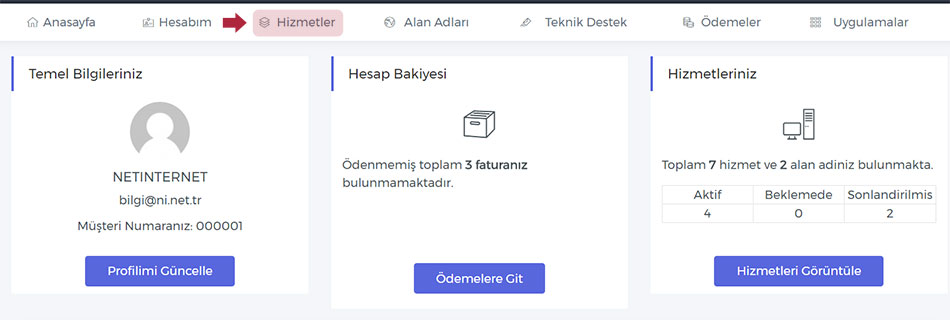
First, log in to your customer panel from the Customer Login section on our website. After logging into the panel, click on the Services section in the top menu to navigate to the section where all your services are listed.


When you enter the Services section, you will see all active and passive services you have purchased from our company as a list. If you have too many services, you can search for your service from the Search section or select the relevant service from the Filter section to display only the service whose traffic reports you want to monitor. After reaching your service in the list, click the View button on the right to navigate to the features section of your service.


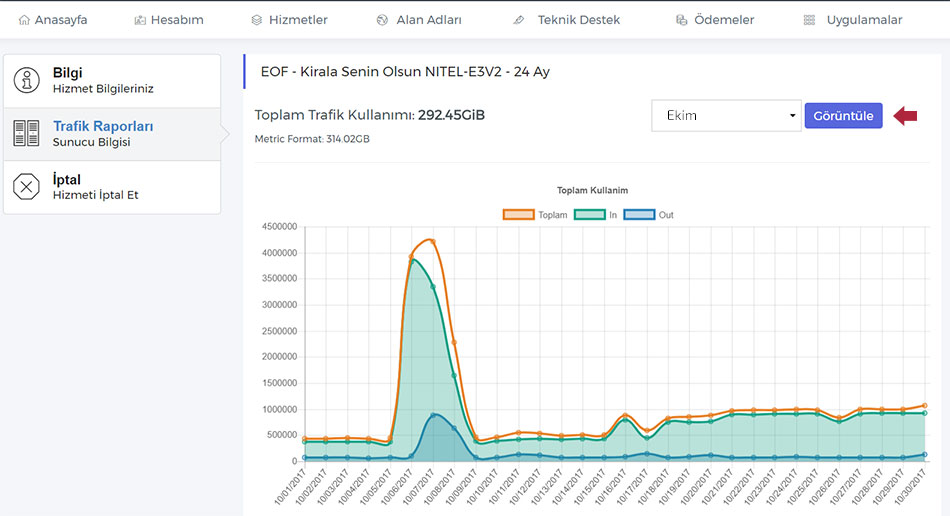
When you enter the features section, on the page that appears, you will see the following sections in the left menu,


  • Information

  • Traffic Reports

  • Service Cancellation


When you click on the Traffic Reports section, you will have accessed the traffic reports of your relevant server. You can examine all your traffic consumption in detail, both daily and monthly, from the day your server was activated. Please note that the data here does not come in real-time; daily reports are delivered.


Thanks to this reporting process we provide to you, you can easily monitor how much traffic you use. This way, you can purchase traffic packages according to your needs.

759 Hit
0 Comments
View Details